Shell Drop 5.2.3 adds SSH agent forwarding, the equivalent of ssh -A. The server you are connected to can use the SSH keys stored in Shell Drop to reach other servers, and the private keys never leave your phone. The release also lets you choose the upload folder on the server, and changes the default keyboard toolbar order.
Shell Drop 5.2.3 went to App Review on 31 October 2026.
With forwarding on, the server can use the SSH keys stored in Shell Drop to reach other servers. That covers:
No keys are left on the server. The private keys never leave the phone.
Forwarding is off by default. It is set per saved connection, and per device, so turning it on for a server on your iPhone does not turn it on for that server on your iPad.
Tap and hold a connection, choose Edit, and switch on Forward SSH keys. The same switch is in Settings > Login and connections > Saved connections.
The first time a server asks for a signature on a connection, Shell Drop shows a confirm card on the phone. It names the server, the key, and the login the signature is for, such as git for GitHub. You choose one of three buttons:
Signing needs Face ID or your passcode. Allow for this connection asks once, then signs without the card until you disconnect or tap Revoke, so an agent running git over and over is not stopped at every step. A pill just under the tabs shows the server and how many signatures it has made, with a Revoke button.
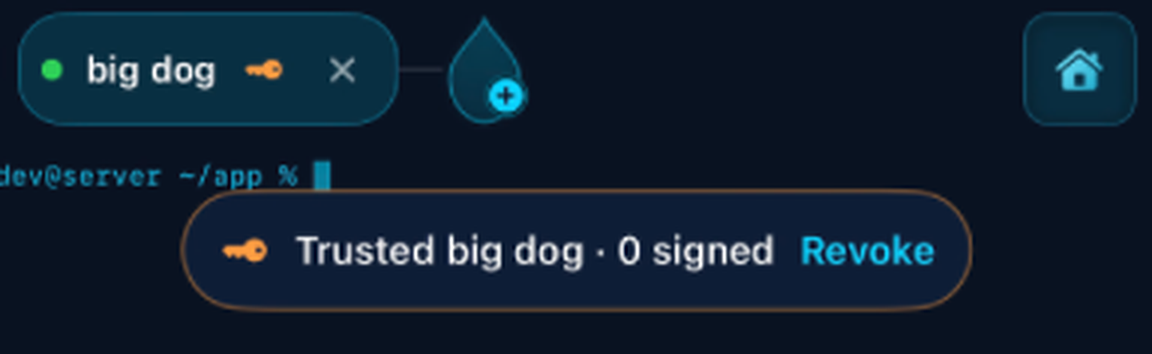
Allowing covers one key on that one connection. A second key, another server, or a new connection gets its own card.
If you want a card for every signature, open the connection's settings and set Ask before signing to Every time. The default is Once per connection.
Shell Drop always says why. When the app is open, a banner explains it; when it isn't, you get a notification. It refuses a request that nobody answers within a minute, one that arrives while Shell Drop isn't open and the connection hasn't been allowed yet, and any request while the phone is locked. It also tells you when the server has agent forwarding turned off, or when the device has no SSH keys to offer. The forwarded agent closes when the connection closes.
The keys stay on the phone, so a push that runs while the phone is locked can't use them. For unattended jobs, a deploy key or token on the server is still the right tool.
When an agent runs several git commands at once, the card shows how many more are waiting, and one Allow for this connection covers them all. If the connection drops and the tab reconnects on its own, it stays allowed, so moving between wifi and mobile data doesn't ask again.
A tmux session you started before connecting still points at the old agent socket, so git inside it can't find your keys. This is standard ssh -A behaviour. Add this to the server's ~/.bashrc or ~/.zshrc, and git inside tmux follows whichever connection is live:
if [ -S "$SSH_AUTH_SOCK" ] && [ ! -L "$SSH_AUTH_SOCK" ]; then
  ln -sf "$SSH_AUTH_SOCK" ~/.ssh/ssh_auth_sock
fi
export SSH_AUTH_SOCK=~/.ssh/ssh_auth_sockLike ssh -A, Shell Drop offers every key whose private half is on the device. Forwarding works with Ed25519 and ECDSA keys, including keys held in the Secure Enclave. The security page covers how keys are stored.
Attached files, images and pasted screenshots can now go to a folder you choose on the server, in place of /tmp. Set it in Settings > Agents > Upload folder. The default stays /tmp, and ~/ means your home folder.
Save and check checks the folder on every connected server, and offers Create it where it is missing. Shell Drop checks the folder again before every upload. If it has been moved or deleted, is a file, or cannot be written to, the upload stops and says so, with the option to create the folder, try again, or upload to /tmp just this once.
Files are named by date and time, for example 2026-10-31-105105-image.png.
The default keyboard toolbar buttons have a new order, with select and copy, paste and backspace up front. New installs get it straight away. If you already use Shell Drop, your current layout stays as it is. To switch to the new order, go to Settings > Keyboard > Keyboard toolbars > Reset keyboard toolbars.
Agent forwarding and the upload folder both came from user requests. If there is something you want next, send a feature request from the homepage. It comes straight to me.
Shell Drop is free on the App Store for iPhone, iPad and iPhone Duo, iOS 17+.