
Half open, the iPhone Duo becomes a tiny laptop
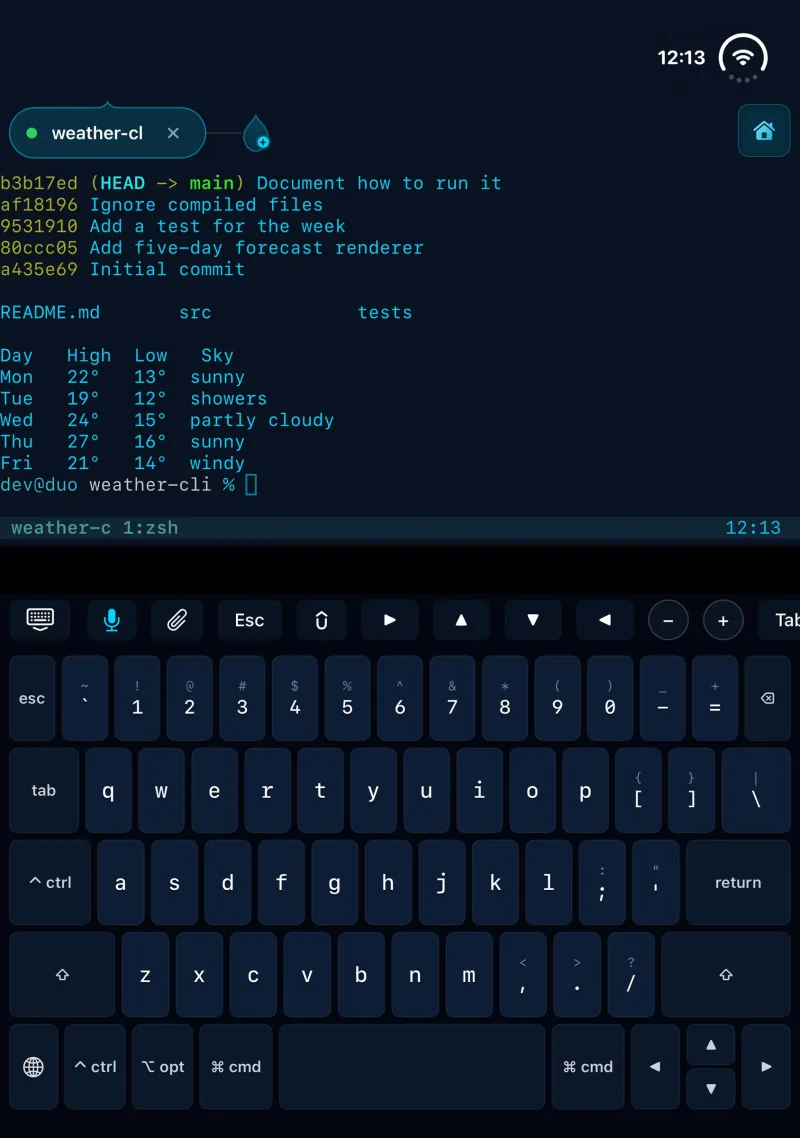
Laptop mode is part of Shell Drop 5.2.6. Fold the iPhone Duo halfway and stand it on a desk, and the terminal fills the top screen while a full keyboard fills the bottom one, with esc, ctrl, opt, cmd, a number row and arrow keys. It is built for running Claude Code, Codex and other AI agents over SSH and Tmux, with a keyboard that types like a laptop’s.
Why a half-open Duo is a tiny laptop
The idea came from holding the Duo the way a laptop sits on a desk: half open, the bottom half flat, the top half angled up. That shape is a screen above a keyboard deck, so the bottom screen became the keyboard.
Shell Drop watches the Duo’s fold. When the phone is partly folded and the fold runs across the screen from side to side, laptop mode turns on. Open the Duo flat and it turns off, and the terminal takes the whole inner display again. There is no setting to find, because folding the phone is the switch.
The keys an agent session uses all day
The first version had ctrl and opt on the bottom row and no Command key. That was the first thing to change. On a Mac, Command is where the shortcuts live, and a keyboard laid out like a laptop should behave like one. Laptop mode has cmd on both sides of the space bar. Tap it and every key that does something with it lights up with a label: cmd 1 to 9 jumps between tabs, cmd T opens a new session, cmd W closes one, cmd [ and ] step through tabs, cmd = and minus zoom, cmd K clears the screen, and cmd C and V copy and paste. Keys with no shortcut dim, so what is available is clear at a glance.
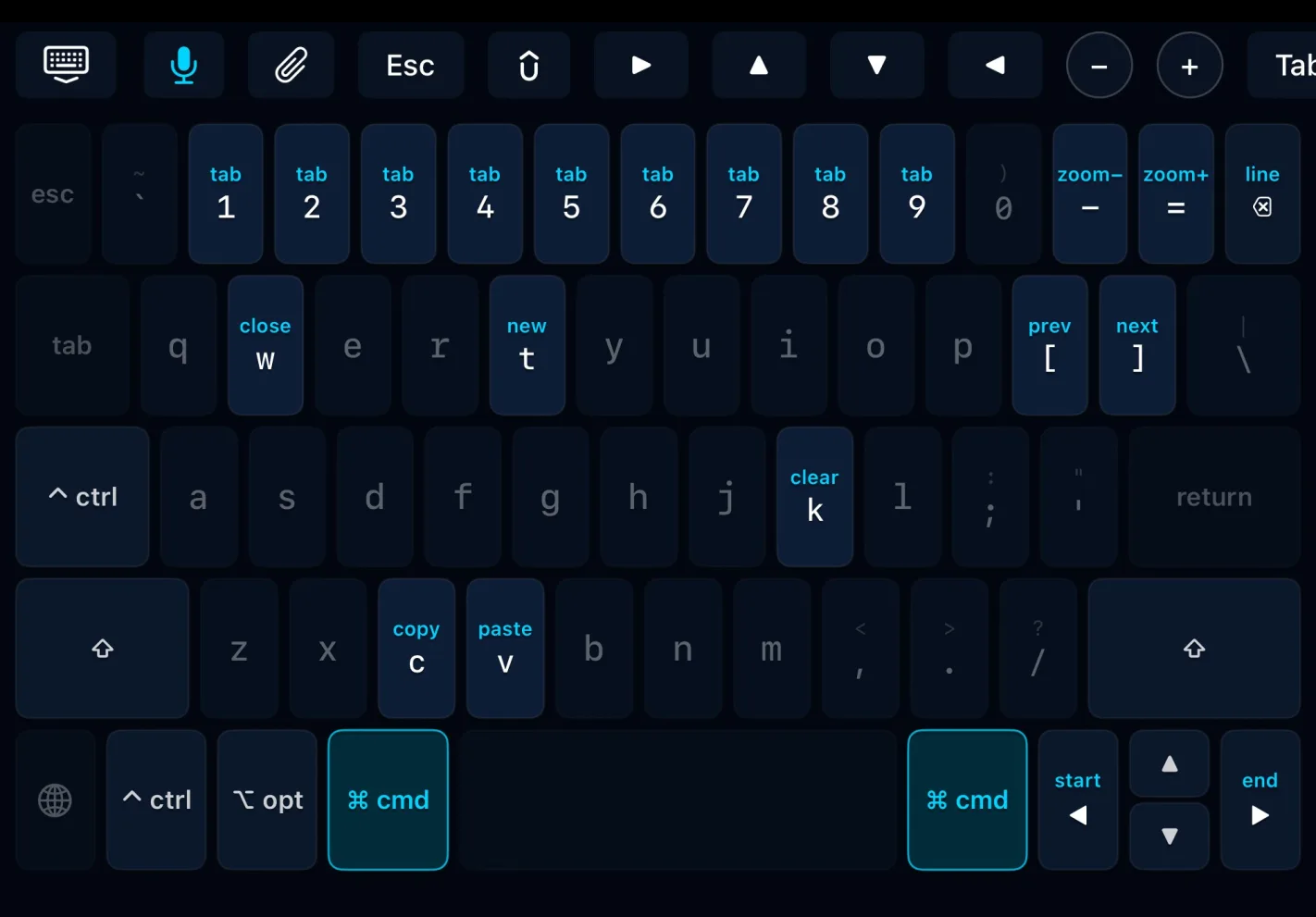
The rest of the layout came from what a Tmux session with an agent in it asks for most:
- Ctrl sits where caps lock usually is, and again on the bottom row, because ctrl C, ctrl R and the Tmux prefix get pressed constantly.
- Ctrl, opt, cmd and shift apply to the next key with one tap. A double tap locks them on until they are tapped again.
- A full number row with its symbols, esc at the start of it and the backtick beside 1.
- Arrow keys that also work inside vim, less and other full-screen programs. Opt with left or right jumps a word, cmd with left or right goes to the start or end of the line, and cmd with backspace deletes back to the start of the line.
- Backspace, space and the arrows repeat when held.
- Shell Drop’s keyboard toolbar sits on top as the function row, so esc, the arrows, Tab, zoom, the mic and the attach button are where they are everywhere else in the app.
Room for voice
A lot of agent work happens by voice. Voice keyboards like Wispr Flow and Willow type what is said straight into the terminal, and they live inside the iOS keyboard. So the globe key at the bottom left of laptop mode’s keyboard swaps the bottom screen to the iOS keyboard, and from there to whichever voice keyboard is installed. The hide-keyboard button on the toolbar brings Shell Drop’s keyboard back.
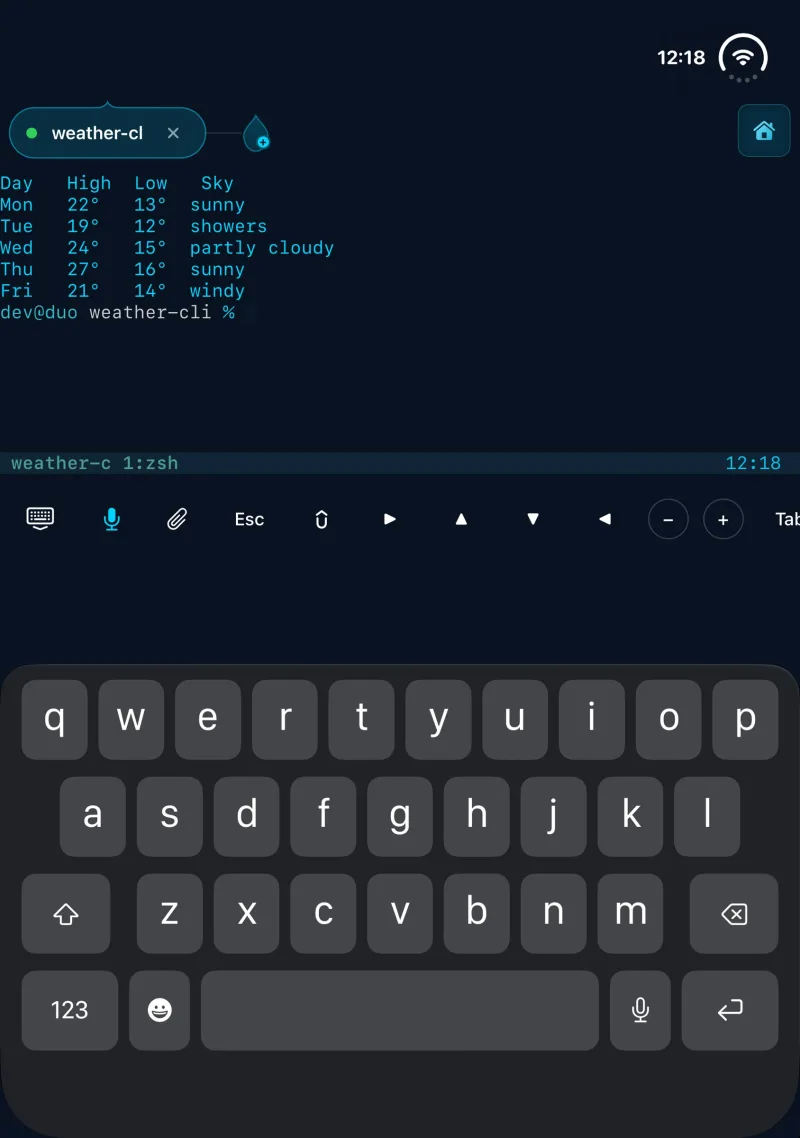
Voice mode goes one step further. A button beside Home gives the terminal as much of the screen as it can, so more of the agent’s output is on screen at once, and keeps the voice keyboard’s mic within reach. It works with Wispr Flow, Willow or iOS dictation.
We also tried a large Return bar across the bottom of voice mode, a big target for sending each message. It came out again. The voice keyboards already have a Return key of their own, so the bar was a second button doing the same job and taking room from the terminal. Voice mode keeps the standard keyboard toolbar above the voice keyboard, the same one used everywhere else.
Folding in and out mid-session
The Duo gets folded, unfolded and turned mid-session all the time, so a lot of the work in laptop mode went into the moments between positions:
- Folding the Duo while the iOS keyboard is up gives the full-size laptop keyboard straight away, at its proper height.
- Opening it flat again brings the keyboard back up, so typing carries straight on.
- Laptop mode builds its own copy of the keyboard toolbar for the function row, separate from the one that sits above the iOS keyboard, which keeps rotating and unfolding smooth.
- The session carries on through all of it. Fold, unfold or rotate, and the SSH connection and whatever the agent is doing stay exactly where they were.
One of ten positions
Laptop mode is one of the 10 ways Shell Drop fits the iPhone Duo. Closed, the outer display gives the terminal its full width, about 22% more columns, for a quick check on an agent without opening the phone. Open flat, the terminal fills the inner display in any of four directions, and Duo mode puts two sessions side by side. Half open with the fold running down the middle, held like a book, those two sessions sit on either side of the spine. Half open with the fold running across, it is a laptop.
Every Duo release also goes through a stress test across the closed and open positions, folding, rotating and switching hundreds of times and checking the app after every step.
Every part of the Duo, put to work
The idea behind all of it is simple: every part of the iPhone Duo should do something useful for the person running agents on it. The outer display, the inner display, the hinge and the angle it sits at each became part of how Shell Drop works, and laptop mode is the hinge’s turn.
Shell Drop is free on the App Store for iPhone, iPad and iPhone Duo, iOS 17+. Laptop mode arrives with 5.2.6.